VCF Operations Orchestrator
VCF Operations Orchestrator: Auto-Document Your Actions with Ease

I spend much of my time developing VCF Operations Orchestrator code. Even with a structured development process, documentation can fall behind frequent code changes.
I created a script to automate the documentation. It needed to meet these requirements:
- Generate Markdown (.md) files compatible with GitLab, GitHub and Azure DevOps Wiki.
- Extend Build Tools for VMware Aria.
- Use NodeJS, which is already required by Build Tools for VMware Aria.
- Require few or no dependencies.
- Read and process checked-out source code.
- Handle standard actions, class wrapper actions, prototypes and inline methods.
- Support JSDoc tags.
- Use the code's module hierarchy for the documentation.
The vcf-operations-orchestrator-doc-generator repository contains the tool and usage instructions. It requires code managed with Build Tools for VMware Aria in a JS-Based Actions-Only Project.
The documentation tool provides the following features:
- Documents actions used as class wrappers.
- Groups standard actions into one document per parent directory.
- Includes the module path.
- Detects class inheritance (extends).
- Documents prototype-based and inline functions.
- Documents all parameters and returns.
- Preserves examples with JavaScript syntax highlighting.
- Produces Markdown (md) files.
- Creates a root-level README linking to all sub-pages.
- Matches the documentation folder structure to the code hierarchy.
- Integrates with a pipeline to publish to systems such as Azure DevOps Wiki.
If you’re not using the Build Tools, Mayank Goyal has created a tool called VRODoc that can connect to Orchestrator and document Actions in a package.
If you want to document your Workflows, Josh Broadway also has a tool, vcf-automation-orchestrator-automated-workflow-documentation.
Example documents
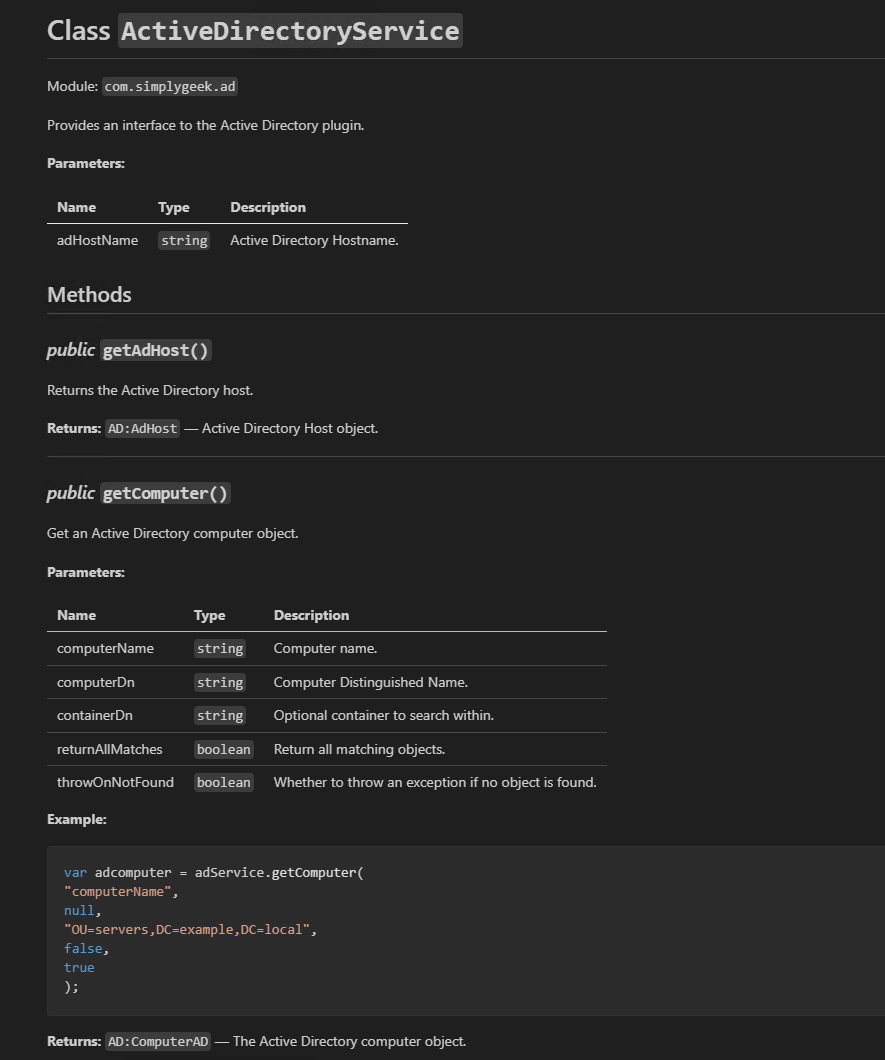
Class document
ActiveDirectoryService.md documents a class and all its methods in one file.
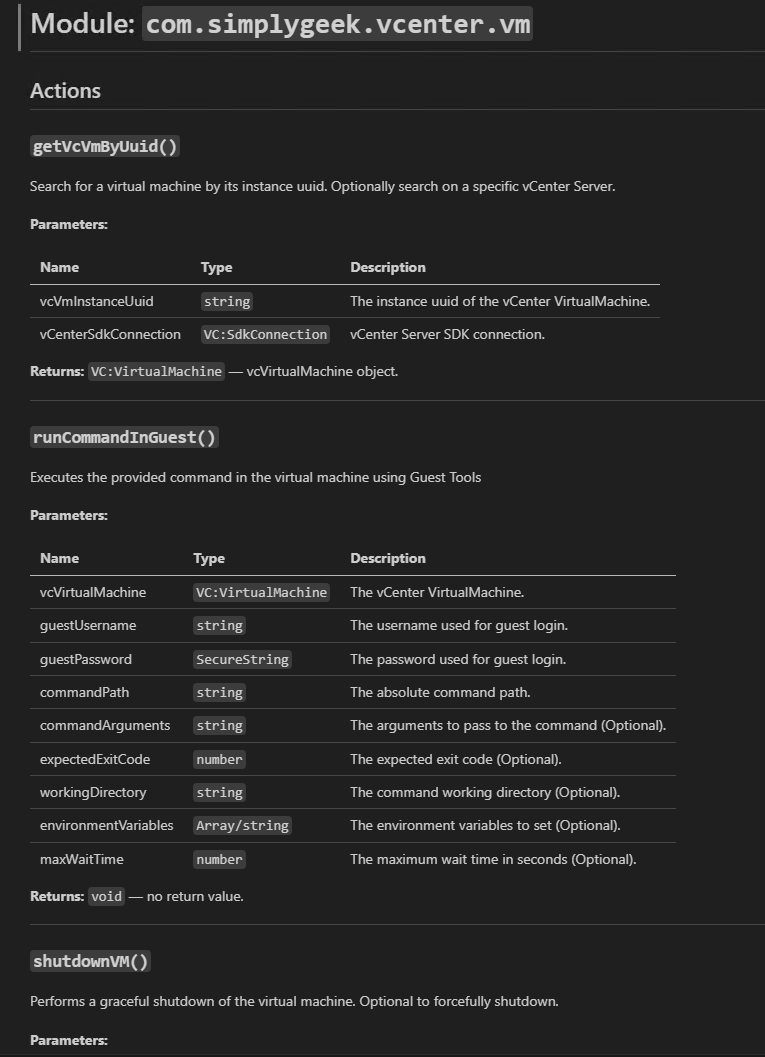
Standard action document
vm.md documents the com.simplygeek.vcenter.vm module. It presents each action in that module as a function.
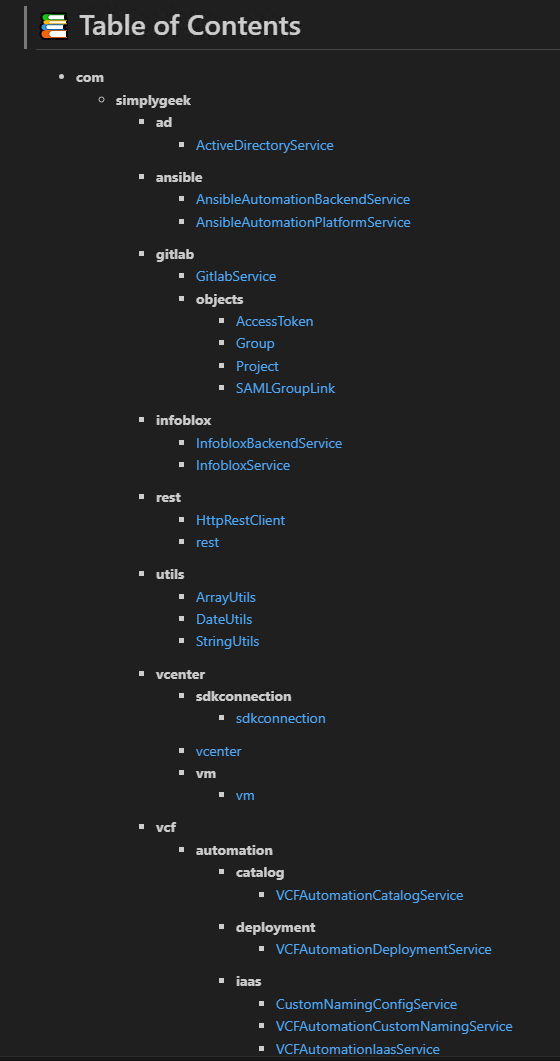
Top-level README (table of contents)
README.md provides a top-level table of contents for all generated files.
The script generates documentation automatically. I can integrate it into my pipeline and publish the output to my preferred wiki.
I hope this helps you automate your documentation. This is the initial release, so there may be issues. I welcome feedback and will help where I can.
Please feel free to reach out with any questions or suggestions.
Related articles

How I Write Beautiful Code in VCF Operations Orchestrator using ESLint and Prettier
Configure ESLint and Prettier for Orchestrator JavaScript development, including command-line checks, VS Code formatting and performance tuning.

VCF Operations Orchestrator: Why I Write Actions and Not Workflows (Mostly)
Why I move Orchestrator logic into reusable JavaScript actions, keep workflows small and use development tools for testing and code review.

VCF Automation – Native Git Integration vs Alternatives
Compare native Git integration, APIs, Terraform and Build Tools for managing VCF Automation infrastructure and content.
Archived comments (2)
Comments from the original blog, preserved for reference.
Join the discussion
Sign in with GitHub to leave a comment. View discussions on GitHub.
Just wondering does this have search capability?
HI Mayank. Not currently, My initial goal was to create markdown documents that I could then store in Azure Devops or Gitlab (as their Wiki’s are MD based) and use the search capabilities within those products.